Support
Help, and the fine print
What to expect before you start, what to do when something fails, how credits and refunds actually work, and how to get your photos out or deleted.
Talk to a person
contact@darkstudio.photo
One mailbox for everything — a question, a bug, a refund, a request about your data. You do not need an account to use it, which matters if you are here because someone else uploaded a photo of you.
There is also a Discord, where we answer questions and share updates. Anything about money or your personal data is better sent to the mailbox, where it leaves a record.
Questions
Before you start
10 to 20 is the sweet spot, but nothing is enforced — the app only insists on at least one photo. Varied photos matter far more than lots of photos: different angles, expressions, backgrounds, lighting, and clothing. Each file can be up to 25 MB, and you can upload from your device, your camera, Google Drive, Google Photos, or OneDrive.
Training runs about 30 minutes, 1 hour, or 2 hours depending on the resolution tier you pick, and it happens once per person. After that, generating takes roughly 30 seconds to 2 minutes per photo, and you can queue up to 32 photos in one go.
No. A generation is described entirely by the template you choose, plus optional style, skin, hair and clothes selections behind a "Customize appearance" toggle that is still in beta. There is no free-text prompt field.
No. Credits stay on your balance until you spend them. There is no subscription, no monthly minimum, and no free tier — you buy credits when you need them, from $1 upward.
Generated images are yours to use, subject to the terms and to the rights of the person depicted. They are synthetic images, not photographs of real events, and they must not be presented as documentary evidence, identification, or journalism.
Your own, or those of an adult who has specifically agreed to a model being trained on their likeness. Never photos of anyone under 18, with no exceptions. A photo being public, or you having taken it, is not the same as that person agreeing.
Yes, as many as you like — there is no account limit. Each person gets their own trained model, their own generation history, and their own training cost. Consent is confirmed separately for each one, because each person is a separate individual whose agreement you are warranting.
Getting good results
The photos you upload decide almost everything
Training learns one person from the photos you upload. Anything that repeats across all of them — the same jacket, the same room, the same pose — may mislead the model into learning it as part of the person. The most important rule, therefore, is: diversity.
01
Aim for 10–20 photos
Enough to see the person from several sides. Beyond that you mostly add training time rather than accuracy.
02
Skip near-duplicates
Ten frames from a single burst carry roughly one photo worth of information, while still pulling the model toward that one moment.
03
Keep them sharp and well lit
Blurry, dark, or heavily filtered photos teach blur and noise along with the face. A sharp 1024 px photo beats a blurry 4000 px one.
04
Just this one person
In a group shot the model cannot tell which face it is meant to learn, so it may blend features from several people.
05
Do not hide the face
Sunglasses, low hats, and heavy shadow tend to reappear in the generated photos — unless that is the look you are after.
06
Mix close-up, half-body, and full-body
Close-ups teach the face, wider shots teach proportions. A set of only head-shots struggles whenever you later ask for a full-body photo.
07
Vary the angle and expression
Front-on, three-quarter, profile; smiling, neutral, talking. Repeating one pose across every photo teaches that pose as part of the person.
08
Vary background, lighting, and clothing
This is what lets the model separate the person from their surroundings. Wearing the same jacket in all of them can make the jacket part of their identity.
Variety
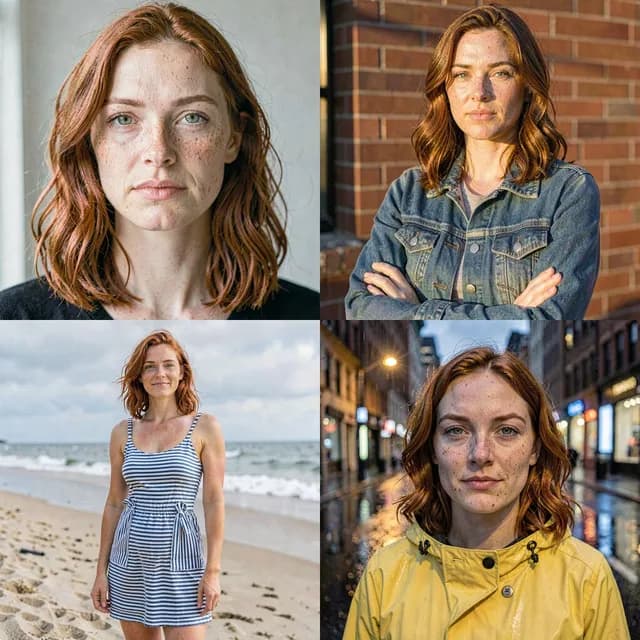
Do
Different backgrounds, lighting, and clothing
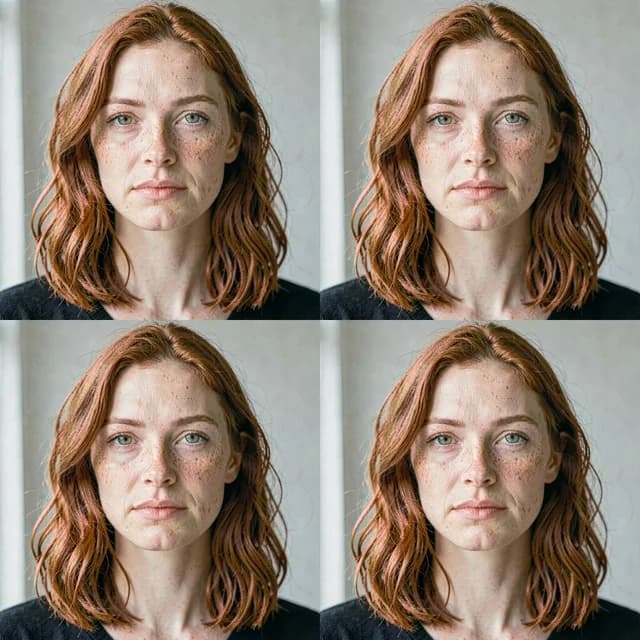
Avoid
The same outfit and room in every frame
Sharpness and light
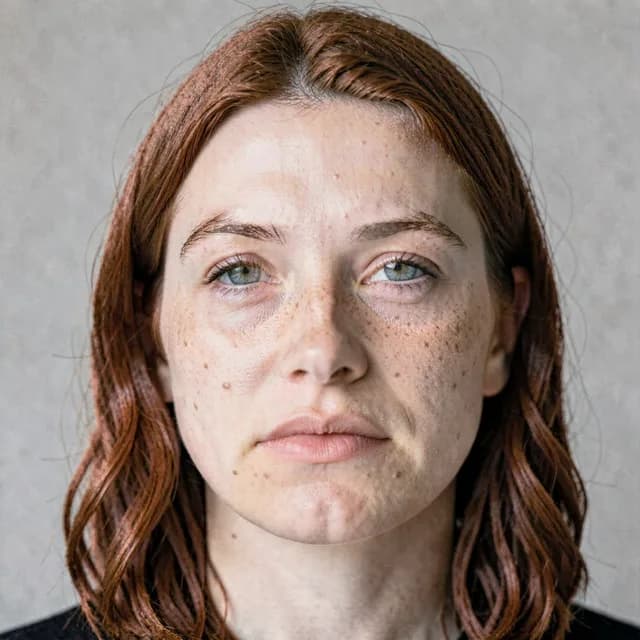
Do
Sharp, evenly lit, face in focus
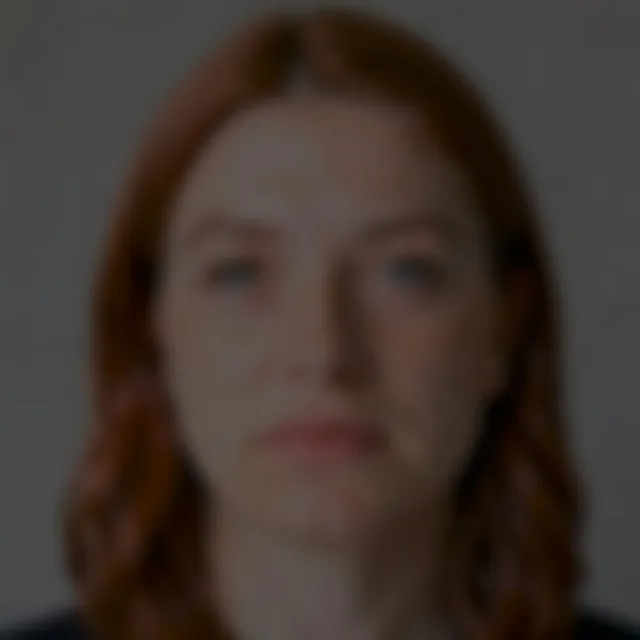
Avoid
Blurry, underexposed, noisy
When something goes wrong
The five things that actually go wrong
Most of these resolve themselves, and two of them are the system working as designed rather than a fault.
Training failed
The credits for a failed training job are returned to your balance automatically — you do not need to ask. The person stays in your list with their photos intact, and Retry Training starts again from the same set. If it keeps failing on the same photos, it is worth removing anything very large, very dark, or heavily filtered before the next attempt.
A generation failed, or only some photos arrived
Credits for the photos that failed come back to your balance automatically; the ones that succeeded stay in the thread and are charged. Sending the same template again is safe — nothing is stuck.
Photos stopped loading, or a saved link no longer works
That is deliberate. Your photos have no public address: each time one is shown to you the service mints a personal link that expires after an hour. Reloading the page, or coming back to the tab, fetches fresh links. It also means a photo URL copied out of the browser will stop working — download the file instead if you want to keep it.
The generated photos do not look enough like the person
Almost always the training set rather than the model. Photos that all share one outfit, one room, or one pose teach the model that those things are part of the person; near-duplicates from a single burst add training time without adding information. Rebuilding the set with more variety and retraining is the fix — note that retraining is a new training job and costs again.
Sign-in is not working, or a provider is refused
If you have an account already, connect any additional sign-in method from My Account before trying to use it on the login screen — especially Apple Hide My Email, which hands us a different address each time and would otherwise look like a new person. An identity that already belongs to another Dark Studio account cannot be connected automatically; write to us and we will sort it out.
Credits and refunds
What happens to your money
Two different things get called a refund, and they are not the same: credits coming back to your balance, which the service does by itself, and money coming back to your card, which we do by hand.
Failed jobs return their credits automatically
If a training or generation job fails for a technical reason, its credits go back to your balance without you asking. The same applies to generations cancelled before they start.
Results you do not like are not refundable
Every generation uses real GPU time whatever comes out of it, and AI output is unpredictable — it can be unflattering, distorted, or simply not what you pictured. Start with a small batch to see what a model gives you before committing to a large one.
Unspent credits are refundable for 14 days in the EU
Consumers in the EU keep the statutory right to their money back on credits bought but not spent, for 14 days from purchase. There is no self-service refund button — write to us and we will process it by hand, returning the money to your original payment method within 14 days and removing the corresponding credits.
Prices include VAT where it applies
We may change prices, but never for credits you have already bought. Credits cannot be transferred between accounts or cashed out on request.
The binding version is section 7 of the Terms of Use. To start a refund, write to contact@darkstudio.photo within 14 days of the purchase and say which one you mean.
Your data
Deleting things, and getting them back
Photos of a face are sensitive data, so the rights over them are not decorative. Here is what you can do yourself and what you have to ask us for.
Delete a person and their model
In the app, at any time. It permanently removes their uploaded photos, the model trained from them, their generated photos, and their generation history. This is also how you withdraw consent for one person without closing your account.
Close your account
The app does not have a self-service account-deletion button yet. Write to us from the address you signed up with and we will delete your account and everything under it within 30 days, then confirm — except the payment records Polish accounting law requires us to keep for five years.
Get a copy of your data, or move it elsewhere
Access and portability requests are handled by hand. Write to us and we will answer within one month, free of charge. You can download your generated photos yourself at any time — one photo, a whole result, or every completed photo as a ZIP.
Someone else uploaded a photo of you
You have the same rights as an account holder and you do not need an account to use them. Write to us with enough detail to identify the material. Where the photos are of you and you did not agree, we delete them and the model trained from them, and we may suspend the account responsible.
Requests go to contact@darkstudio.photo and are answered within one month, free of charge. The full list of rights, and how to complain to a supervisory authority if we get it wrong, is in the Privacy Policy.